السنة: 2026
اجتماع قسم التاريخ في مستهل العام الدراسي الجديد
عقد قسم التاريخ، برئاسة رئيس القسم الدكتور حسام أحمد علي، اجتماعًا في اليوم الأول من العام الدراسي الجديد المصادف 31-8-2026، بحضور أعضاء القسم، لمناقشة عدد من الموضوعات المتعلقة بسير العمل والاستعدادات للمرحلة الدراسية المقبلة.
وقد خُصص جانب مهم من الاجتماع لمناقشة التحضيرات الخاصة بامتحانات الدور الثاني، والمقرر إقامتها يوم غدٍ الثلاثاء الموافق 1/9/2026، حيث جرى التأكيد على تهيئة المستلزمات اللازمة لإنجاح العملية الامتحانية، وتنظيم أعمال المراقبة واللجان الامتحانية، وتهيئة الأجواء المناسبة للطلبة لأداء امتحاناتهم.
وأكد رئيس القسم الدكتور حسام أحمد علي على أهمية الالتزام بالتعليمات والضوابط الامتحانية، والتعاون بين أعضاء القسم، بما يسهم في إنجاح الامتحانات وضمان سيرها بصورة منظمة ودقيقة.
وفي ختام الاجتماع، تم التأكيد على مواصلة العمل بروح الفريق الواحد، والاستعداد الجاد لانطلاق العام الدراسي الجديد، بما يحقق أهداف القسم ويرتقي بالمستوى العلمي والأكاديمي للطلبة.



تهنئة بمناسبة ولادة النبي محمد صلى الله عليه وآله والإمام جعفر الصادق عليه السلام
ما أعظم الأيام حين تحمل في طياتها ذكرى من كان وجوده رحمةً للوجود، وما أقدس اللحظات حين تتصل أفراحها بمحمدٍ وآل محمد صلوات الله وسلامه عليهم أجمعين.بمناسبة ذكرى ولادة النبي الأكرم محمد المصطفى صلى الله عليه وآله وسلم، لا نحتفي بميلاد رجلٍ عظيم فحسب، بل بميلاد الرسالة التي أيقظت فطرة الإنسان، وأعادت للروح معناها، وللأخلاق مقامها، وللعدل صوته، وللرحمة مكانها.وُلد محمدٌ صلى الله عليه وآله، فكان الصادق حين عزّ الصدق، والأمين حين خانت الأمانة، والرحيم حين قست القلوب، والعفوّ حين كان الانتقام أيسر الطرق، كان قلبه للضعفاء وطنًا، وكلمته للحق عهدًا، وسيرته تجسيدًا حيًّا لقوله تعالى:﴿وَإِنَّكَ لَعَلَىٰ خُلُقٍ عَظِيمٍ﴾وتتضاعف أفراح هذه المناسبة المباركة بذكرى ولادة الإمام جعفر الصادق عليه السلام، حفيد رسول الله صلى الله عليه وآله وسلم، ووارث مدرسة العلم والهداية، الذي جعل من العلم سبيلًا إلى معرفة الله، ومن الأخلاق أساسًا لبناء الإنسان، ومن الحكمة نورًا يهدي العقول والقلوب، فإذا كان محمدٌ صلى الله عليه وآله أصل الرسالة ومبعث الرحمة، فإن الإمام الصادق عليه السلام كان من أعلام الامتداد العلمي والروحي لمدرسة النبوة، ناشرًا للعلم، ومجسّدًا للتقوى، وداعيًا إلى الحق بالحكمة والبصيرة.وفي هذه الذكرى العطرة، يتجدد فينا اليقين بأن أعظم الاحتفاء بمحمد وآل محمد عليهم السلام ليس بالكلمات وحدها، وإنما باستحضار سيرتهم في حياتنا؛ أن نكون أصدق قولًا، وأطهر قلبًا، وأرحم بالناس، وأشد تمسكًا بالعلم والعدل والفضيلة.
وبهذه المناسبة المباركة، يتقدم قسم التاريخ بأسمى آيات التهاني والتبريكات إلى أساتذة وموظفي وطلبة القسم، وإلى الأمة الإسلامية جمعاء، سائلين الله تعالى أن يجعلها مناسبةً للخير والبركة، وأن يرزقنا الاقتداء بسيرة النبي الأكرم وأهل بيته الأطهار عليهم أفضل الصلاة والسلام.مباركٌ لكم ميلاد الرحمة، ومباركٌ لكم ميلاد العلم والحكمة، ومباركٌ لكم ذكرى ولادة محمد المصطفى والإمام جعفر الصادق عليهما الصلاة والسلام.
قسم التاريخ

Transaction Hash and Blockchain Explorer: How to Check a Crypto Transfer

After reading this guide, you will be able to take a transaction hash, open the correct blockchain explorer, and verify whether a crypto transfer reached the intended network and address. You will also know what an explorer cannot prove, which matters when a wallet or exchange still shows no balance.
You need only four preliminary concepts: an asset such as BTC or USDT, the blockchain network carrying it, a public receiving address, and a transaction hash. Everything else will be introduced when it becomes useful.
What a transaction hash actually tells you
A transaction hash, often called a transaction ID or txid, is a cryptographically generated identifier for a submitted blockchain transaction. Wallets and platforms usually display it after the transfer has been broadcast. Entering that identifier into an explorer retrieves the corresponding on-chain record. Ethereum documentation, for example, lists the hash, status, block, timestamp, sender, recipient, transferred tokens, value, and transaction fee among the data an explorer may show. [1]
The closest everyday analogy is a parcel-tracking number. It helps you locate one shipment among millions and follow its progress.
The analogy stops there. A courier can sometimes redirect or return a parcel. A confirmed cryptocurrency transaction generally cannot be edited or cancelled by the sender. The txid also does not contain customer-support authority: possessing it does not give anyone control over the funds.
A blockchain explorer is a viewing interface for public network data. It does not hold your coins, reverse transfers, recover private keys, or decide when a custodial service credits an account.
Network first, hash second
Before searching for a transaction, identify the network used to send it. This is especially critical for tokens available on several blockchains. USDT, for instance, exists across multiple protocols, so the ticker alone does not identify the route taken by a transfer. [2]
An Ethereum transaction hash belongs in an Ethereum-compatible explorer. A TRON transaction belongs in a TRON explorer. A Bitcoin txid belongs in a Bitcoin explorer. Searching the right hash on the wrong network commonly produces “not found,” even when the transfer exists elsewhere.
Check the network in the sending wallet’s transaction details or withdrawal history. Then compare it with the network selected on the receiving platform. Similar-looking asset names are not enough: the sender and recipient must support the same asset on the same network.
Use an explorer recommended by the blockchain project, wallet, or receiving platform rather than clicking an unfamiliar advertisement in search results. Fake explorer pages may imitate legitimate interfaces to solicit wallet connections, seed phrases, or private keys. A normal transaction lookup requires only public information such as a txid or address.
Anatomy of a sample operation
Consider a neutral learning example: a user creates an order to exchange one asset for USDT and chooses Ethereum as the delivery network. This does not mean that a particular pair or network is currently available. It is simply a way to examine the fields that appear before and after a transfer.
The exchange order displays the asset being provided, the requested output asset, the network, a recipient address, an amount to send, an estimated amount to receive, a quoted rate, applicable fees, and an order status. Once an on-chain payment is broadcast, a transaction hash may appear.
Selected asset
What it means: the cryptocurrency being sent or received. In this example, the expected output is USDT.
Where it comes from: the selection made when creating the exchange order and the receiving wallet’s deposit instructions.
What to compare: the asset name in the order, the withdrawal screen, and the receiving account. For contract-based tokens, also check that the explorer identifies the intended token transfer rather than showing only the network’s native coin.
If it is wrong: the recipient may receive a different asset, or the platform may be unable to credit it automatically.
Selected network
What it means: the blockchain over which the transaction travels. In the sample operation, it is Ethereum.
Where it comes from: the network chosen in the order and accepted by the destination wallet or platform.
What to compare: the full network name on both sides. Do not infer the network from the token ticker or from a familiar-looking address alone.
If it is wrong: the transaction may be valid on the sending network but inaccessible through the receiving service. Recovery, if technically possible, depends on the recipient and should never be assumed.
Recipient address
What it means: the public destination to which the blockchain transaction is directed.
Where it comes from: the receiving wallet, exchange deposit page, or active exchange order.
What to compare: check the beginning, end, and several characters in the middle. The safest comparison is the complete address shown in the wallet’s final confirmation screen against the original destination.
If it is wrong: a valid transaction can still send funds to the wrong destination. Blockchain confirmation proves what the network processed, not what the sender intended.
Memo or Tag, when requested
What it means: an additional identifier used by some custodial platforms to assign a deposit made to a shared address to the correct customer or order.
Where it comes from: the recipient’s deposit instructions. It is not something the sender should invent.
What to compare: copy the Memo, Tag, payment identifier, or equivalent field exactly when the receiving service says it is required.
If it is wrong or missing: the blockchain may still confirm the transfer to the shared address, while the platform cannot automatically identify the intended account. Some blockchain designs and exchange integrations explicitly use a memo or embedded identifier for this allocation. [3]
Amount to send and estimated amount to receive
What they mean: the input amount is what the sender must transfer. The output is what the order currently indicates the recipient should receive under the displayed conditions.
Where they come from: the order calculation, including its quoted rate and any disclosed fees.
What to compare: distinguish the requested transfer amount from the final output. Also check whether a wallet deducts its network fee separately or from the entered amount.
If they are confused: an underpayment may leave an order incomplete, while sending more than requested may require manual review. Actual handling depends on the operation and platform rules.
Rate and fee
What they mean: the rate describes the conversion between the selected assets. A fee may cover blockchain processing, service costs, or another component identified in the order.
Where they come from: the current order interface before approval. They are not encoded in the txid as a complete commercial explanation.
What to compare: review the quoted rate, amount to send, output estimate, and fee presentation together. The explorer may show an on-chain network fee, but that is not necessarily the same as every amount included in an exchange calculation.
If overlooked: the received amount may differ from a simple multiplication based on a market price seen elsewhere.
Status and txid
What they mean: the order status belongs to the service processing the exchange. The blockchain status belongs to the network transaction. The txid connects you to the latter.
Where they come from: the order page, sending wallet, or withdrawal history after broadcast.
What to compare: match the explorer’s destination, asset, transferred amount, and network against the order. Then look at inclusion in a block and the current confirmation state.
If misunderstood: “successful” in an explorer means that the network processed the transaction according to that chain’s rules. It does not automatically mean that an exchange has completed its internal checks or credited the final asset.
The learning pause before you send
Before pressing an irreversible confirmation button, stop and explain the operation to yourself without relying on color, logos, or shortened labels.
- I am sending this specific asset.
- It is travelling on this specific network.
- This complete address belongs to the intended destination on that network.
- The Memo or Tag is either not required or has been copied exactly as provided.
- This is the amount leaving my wallet, and this is the estimated amount expected at the destination.
- I understand which fee is shown and whether it changes the amount being transferred.
If any sentence cannot be completed confidently, return to the receiving instructions. A screenshot or an old saved address is weaker evidence than the details displayed for the current deposit or order.
Never share a seed phrase, private key, wallet password, or one-time authentication code to “verify” a transfer. Those secrets are not required to inspect a public transaction.
How to check the transfer in an explorer
- Copy the txid from the sending wallet or order page. Do not copy the recipient address by mistake. Both may be long strings, but they serve different purposes.
- Confirm the network. The explorer must cover the chain used for the transfer.
- Paste the txid into the explorer’s search field. Avoid typing it manually.
- Read the status. Depending on the network and explorer, it may appear as pending, confirmed, successful, or failed.
- Check the block information. A transaction included in a block has progressed beyond merely being broadcast. Explorers commonly show the containing block and related timestamp. [1]
- Compare the destination. Match the complete address with the destination supplied for the operation.
- Verify the transferred asset and amount. For a token transfer, inspect the token-transfer section rather than relying only on a native-coin value field.
- Review confirmations or finality information. Receiving platforms may wait for their own required level of network settlement before crediting a deposit.
If you are preparing an exchange rather than reviewing an existing transfer, you can check the currently available asset and network before creating an exchange order. The service supports assets including USDT, BTC, ETH, DAI, LTC, BNB, XMR, and TRX, while adding others gradually; availability of a particular pair, network, or direction still needs to be confirmed before sending funds.
Verification requirements can also vary by operation and the outcome of compliance checks. Review the current conditions before creating an order rather than assuming that requirements from a previous transaction remain unchanged.
Reading common explorer results
The explorer says “not found”
How it looks: no transaction appears after the txid is pasted.
Why it happens: the wrong network explorer was used, the hash was copied incompletely, the wallet has not broadcast the transaction, or the explorer has not indexed it yet.
What to do before sending again: confirm the network and copy the txid directly from the transaction details. Do not create a duplicate payment merely because one explorer has no result.
The transaction is pending
How it looks: the explorer finds the transaction, but no confirmed block or final status is shown.
Why it happens: the transaction has been broadcast but is still waiting for network inclusion or final processing. On Ethereum, a submitted transaction enters the network’s pending pool before a validator includes it in a block. [4]
What to do before taking another action: compare the txid with the wallet record and follow the sending wallet’s instructions. Do not send a replacement payment unless you understand how that wallet handles pending transactions.
The transaction succeeded, but the balance did not update
How it looks: the explorer reports success, while the receiving platform still shows nothing.
Why it happens: the platform may require more confirmations, the wrong network may have been used, a required Memo or Tag may be missing, or the deposit may be undergoing internal or compliance review.
What to do before sending anything else: preserve the txid, order identifier, asset, network, amount, and destination address. Compare them with the deposit instructions and contact the receiving service through its official channel if the discrepancy remains.
The status is failed
How it looks: the transaction exists but is marked failed or reverted.
Why it happens: execution did not complete under the network’s rules. Contract-based transfers can fail for reasons different from a simple address-to-address payment.
What to do before retrying: check whether the transferred asset actually left the wallet and read the wallet’s failure details. A failed transaction may still have consumed a network fee, so do not assume the original balance and fee situation are unchanged.
The hash is confirmed, but the details are not publicly readable
How it looks: an explorer confirms that a transaction exists but does not reveal the familiar sender, recipient, and amount fields.
Why it happens: not every blockchain exposes the same data. Monero is designed to hide transaction participants and amounts from public observers, although a transaction can still have its own txid and confirmation state. [5]
What to do before relying on the explorer alone: use the official wallet’s transaction record and the proof or verification method appropriate to that network. Do not expect an Ethereum-style explorer view from a privacy-focused blockchain.
A first independent verification routine
Start with the sending record, not a message from a stranger. Copy the txid, identify the network, and open an appropriate explorer. Confirm that the transaction exists, inspect its status and block inclusion, then compare the asset, destination, and amount with the current order or deposit instructions.
After that, separate the two layers of evidence. The explorer tells you what happened on-chain. The wallet, exchange, or receiving service tells you whether it has recognized and credited that event under its own confirmation and compliance rules.
This routine cannot make a transfer risk-free. It does, however, expose the errors that are easiest to catch before sending: a mismatched network, an altered address, a missing Memo or Tag, a confused amount, or an explorer opened for the wrong blockchain.
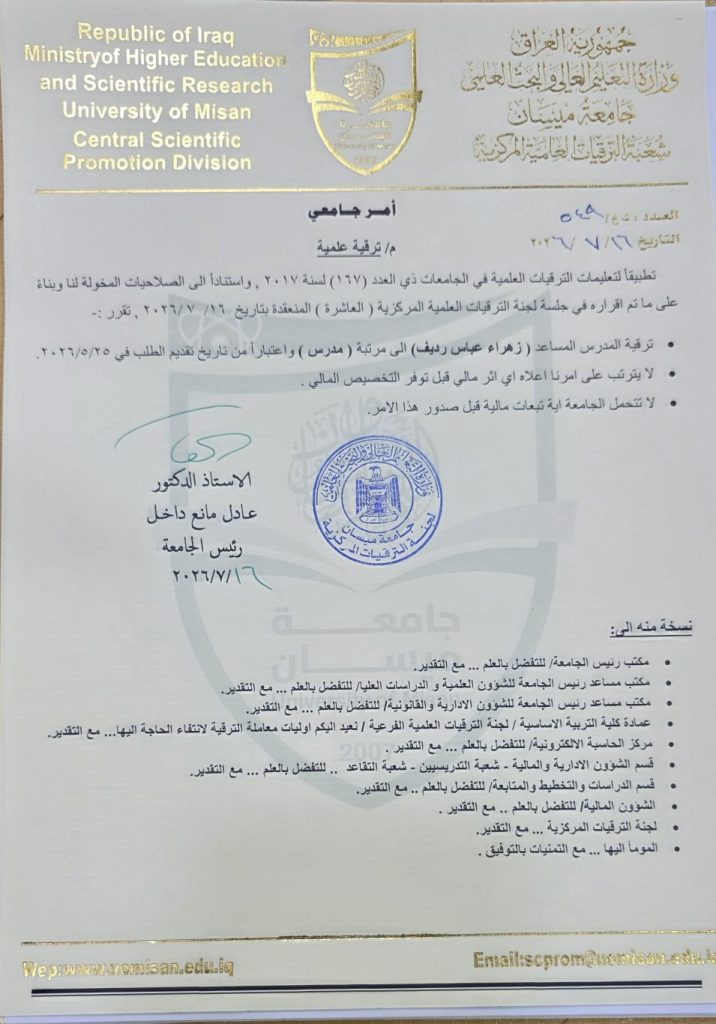
ترقية علمية …..
حصلت المدرس المساعد ( زهراء عباس رديف ) التدريسية في قسم التاريخ بكلية التربية الأساسية على لقب “مدرس ” وذلك بعــد استيفائها لشروط الترقيــة العلميــة.وبهذه المناسبــة السعيدة فإن رئاسة جامعة ميسان وعمــادة كليـة التربية الأساسية وكافة منتسبيهــا من تدريسيين وموظفيــن يتقدمــون بالتهنئة الحــارة والأمنيــات العطرة سائليــن المولـى عز وجل لها دوام الموفقيــة والســداد وإلى مزيـد من التــألق والتفـوق والازدهار.
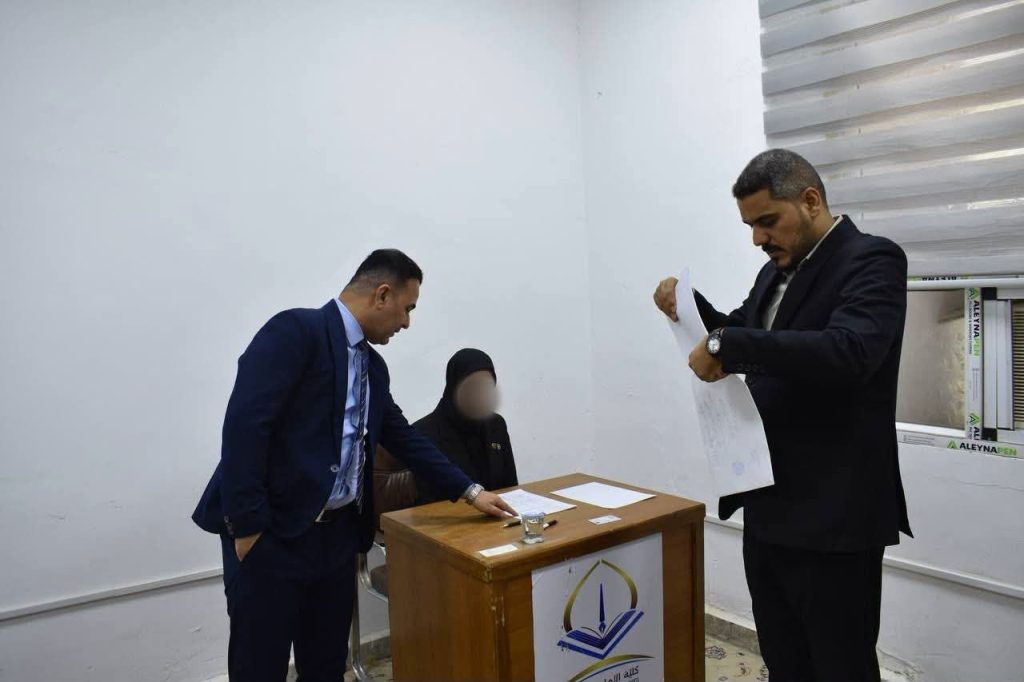
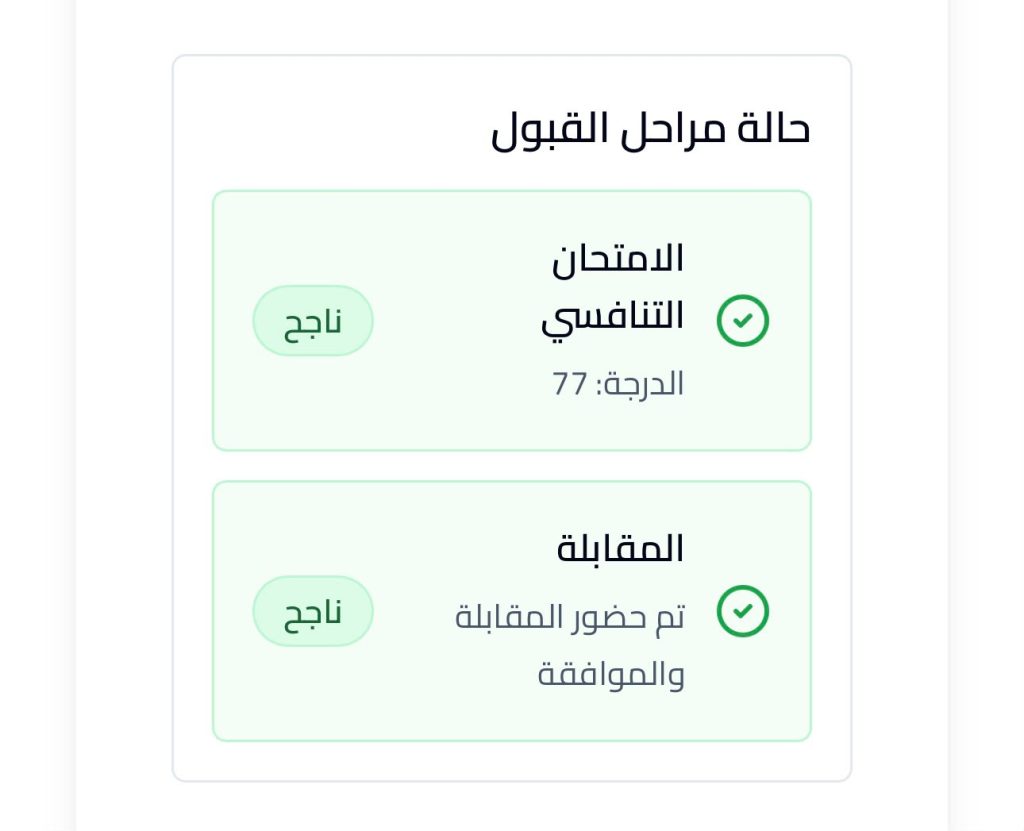
بكل فخر واعتزاز، وفي باكورة تنفيذ اتفاقية الشراكة العلمية للدراسات العليا بين قسم التاريخ في كلية التربية الأساسية وقسم التاريخ في كلية الإمام الكاظم (عليه السَّلام)، حققت إحدى طالبات قسمنا المجتهدات، ومن أوائل خريجات العام الدراسي (2024–2025)، الطالبة (دانية عبدالله كيطان)، إنجازًا أكاديميًا مميزًا باجتيازها الامتحان التنافسي بدرجة (77).وبهذا الإنجاز، سطّرت اسمها واسم قسمها وكليتها بأحرف من نور، لتكون أول طالبة تنال هذا الشرف العلمي الرفيع في إطار هذه الشراكة الأكاديمية، وبهذه المناسبة السعيدة، نتقدم إليها وإلى أسرتها الكريمة بأصدق التهاني والتبريكات، متمنين لها دوام التوفيق والنجاح في مسيرتها العلمية، ومؤكدين استمرار دعم رئاسة القسم لها في مشوارها الدراسي المقبل، سائلين الله تعالى أن يكلل جهودها بالمزيد من التميز والإنجاز.




إعلان لطلبة المرحلة الأولى.
نود إعلامكم بأن امتحان مادة تاريخ أوربا في العصور الوسطى سيكون يوم الخميس، كما نذكركم بأن امتحان مادة التربية الإسلامية سيكون غداً.يرجى من جميع الطلبة الالتزام بالمواعيد المحددة والاستعداد الجيد للامتحانات.مع تمنياتنا لكم بالتوفيق والنجاح.